
On 9/9/2014, Microsoft released a set of security patches for .NET 4. These patches comes down via Windows update and can break the Data Process Control. KB2858725 and KB2894854v2 are two of the known patches, however, there are others.
This can affect all versions of Data Process Control 3.3.0 and below.
Symptoms can vary, however, two (2) common problems are the sudden appearance of the following messages when trying to run processes on demand via the Data Process Control.
Symptom 1:
This page has misbehaved. If this error persists, please contact Breakaway for assistance. Reference: "p_UI_ISBATCHRUN". For more detail check Windows event viewer on application server
Symptom 2:
DataGridPost - System.Data Desc: Cannot find column 9.
These symptoms mainly appear on both the "Settings" panel and the "On demand" panel. Scheduled feeds still work.
When testing and running the p_UI_ISBATCHRUN command in SQL Server (exec bpmc_stage.dbo.p_UI_ISBATCHRUN), a StatExec = 0 is returned.
Solution
As an immediate work around, please uninstall offending KB's. This can be accomplished in Windows on the respective Data Process Control server (Start -> Control Panel -> System and Security -> Windows Updates -> View Installed Updates). Simply locate the aforementioned KB articles and uninstall them. This will immediately normalize Data Process Control functionality.
This issue will be solved in Data Process Control 3.3.1 pack 321 and all cumulative releases.
Thursday, September 18, 2014

Wednesday, August 13, 2014
BPMC IFramework 320 Pack
BPM Connect 320 Pack is now
available.
This pack provides cumulative refinements to the core 300 pack, and includes, but is not limited to the following solutions:
This pack provides cumulative refinements to the core 300 pack, and includes, but is not limited to the following solutions:
- Daisy Chain Cube Processing Intelligence and Performance Improvement
- Kickout Exclusions
- Dynamic Queue Capability
- Cube Process after Dimension/Master Data Feed
- Refresh Interval setting
- Support of Analysis Services msmdpump
- Patch to 319 Pack - Data Map too many arguments specified issue
- DPCInstance setting used to control correct link on email alerts
See manifest for version table:
Manifest.txt
320 Pack can be obtained from Breakaway Technologies.
BPMC_IFramework_320.msi
For customers using SQL Server 2008, once upgrading to 320 pack, please apply the following patch.
This patch does not apply for SQL Server 2012 users.
320 Pack can be obtained from Breakaway Technologies.
BPMC_IFramework_320.msi
For customers using SQL Server 2008, once upgrading to 320 pack, please apply the following patch.
This patch does not apply for SQL Server 2012 users.
Sunday, August 3, 2014
DPCInstance setting used to control correct link on email alerts
A new setting has been added in BPM Connect to allow email alerts to point to the correct instance of the Data Process Control.
For example, the classic email body for email alerts looks like this:
Job Details
BPC Server: ServerName
BPMC Instance: BPMC_Stage
Job Name: Finance_Feed
Message: Job completed with success
Click here to view details
The link "Click here to view details" points to an instance of Data Process Control. By default, the URL will be:
http://servername/dataprocesscontrol
In cases where instances of Data Process Control do not match this URL nomenclature, the link will not be pointed correctly. To correctly point this link, the "DPCInstance" setting has to be set in the global variables of BPM Connect to match the BPM Connect instance URL.
This setting is available in DBobjects 3.3.0 and higher.
See below screen shot:

For example, the classic email body for email alerts looks like this:
Job Details
BPC Server: ServerName
BPMC Instance: BPMC_Stage
Job Name: Finance_Feed
Message: Job completed with success
Click here to view details
The link "Click here to view details" points to an instance of Data Process Control. By default, the URL will be:
http://servername/dataprocesscontrol
In cases where instances of Data Process Control do not match this URL nomenclature, the link will not be pointed correctly. To correctly point this link, the "DPCInstance" setting has to be set in the global variables of BPM Connect to match the BPM Connect instance URL.
This setting is available in DBobjects 3.3.0 and higher.
See below screen shot:

Daisy Chain Cube Processing Intelligence and Performance Improvement
A new intelligent feature has been added to the BPM Connect daisy chain capabilities.
Currently in BPM Connect, when a user schedules feeds for the exact same date and time, it batchs them together in a process called a "daisy chain". This is a classic and highly used feature of BPM Connect. However, classically, when the feeds are batched and run together, the daisy chain would process the cube and rebuild the indexes after ever feed. This added redundancy, performance overhead, and was largely inefficient, especially on large models.
Now available in DBObjects 3.3.0 and higher, the daisy chain batch is intelligent, where it will only process the cube and build the indexes a single time after the daisy chain is complete rather than after each feed.
So for example, if there are 10 fact feeds in a single daisy chain process that load to the same cube, the feed will process the cube and rebuild the indexes on the completion of the 10th feed only. This significantly reduces overhead, increases performance and saves time on the overall daisy chain process.
It is important to note, this solution only works when the feeds daisy chained together share a common destination cube. If the feeds that are daisy chained together share mixed destinations, do not use this functionality.
There is is switch that enabled this capability and it spans across the whole instance. The switch is called "DaisyChainProcessOnce" and is located in Config Builder Global Configurations. Set the switch to "1" to enable behavior , "0" to disable behavior. See below example:

Currently in BPM Connect, when a user schedules feeds for the exact same date and time, it batchs them together in a process called a "daisy chain". This is a classic and highly used feature of BPM Connect. However, classically, when the feeds are batched and run together, the daisy chain would process the cube and rebuild the indexes after ever feed. This added redundancy, performance overhead, and was largely inefficient, especially on large models.
Now available in DBObjects 3.3.0 and higher, the daisy chain batch is intelligent, where it will only process the cube and build the indexes a single time after the daisy chain is complete rather than after each feed.
So for example, if there are 10 fact feeds in a single daisy chain process that load to the same cube, the feed will process the cube and rebuild the indexes on the completion of the 10th feed only. This significantly reduces overhead, increases performance and saves time on the overall daisy chain process.
It is important to note, this solution only works when the feeds daisy chained together share a common destination cube. If the feeds that are daisy chained together share mixed destinations, do not use this functionality.
There is is switch that enabled this capability and it spans across the whole instance. The switch is called "DaisyChainProcessOnce" and is located in Config Builder Global Configurations. Set the switch to "1" to enable behavior , "0" to disable behavior. See below example:
Kickout Exclusions
There are cases where certain dimension may want to be excluded from the kick-out handler. For example, in the case of an account dimension that is auto built via BPM Connect, and a fact feed that runs subsequent to it, it does not make sense to have the kick-out handler incur the overhead of checking the account dimension. Kick-outs are an expensive operation from a performance perspective, so excluding unnecessary dimensions can boost performance, especially on large dimensions and fact tables.
Other dimension that are candidate for exclusion are "data source", "audit trail" or "category" dimensions. These dimensions are usually hard-coded into the feed, and kick-out processing against these dimensions in many cases is redundant. Each instance should be analyzed for the appropriate exclusions depending on the scenario.
When applying exclusions, while this may boost performance, keep in mind, these dimension are in essence not be checked for kick-outs. If this capability is misapplied, dirty-data may enter into the fact table thus causing the cube processing to fail during. Use exclusions cautiously.
Exclusions are added in via global settings in the Config Builder and transcend the whole instance of BPM Connect. Note: you cannot apply exclusions feed by feed, these exclusions will affect all feeds across any given instance.
The following is an example of how the configuration can be set up against a hypothetical account and category dimension:

This capability is available in DBObjects version 3.3.0 and higher, or can be applied via this SQL patch kick-outs 3.0
Other dimension that are candidate for exclusion are "data source", "audit trail" or "category" dimensions. These dimensions are usually hard-coded into the feed, and kick-out processing against these dimensions in many cases is redundant. Each instance should be analyzed for the appropriate exclusions depending on the scenario.
When applying exclusions, while this may boost performance, keep in mind, these dimension are in essence not be checked for kick-outs. If this capability is misapplied, dirty-data may enter into the fact table thus causing the cube processing to fail during. Use exclusions cautiously.
Exclusions are added in via global settings in the Config Builder and transcend the whole instance of BPM Connect. Note: you cannot apply exclusions feed by feed, these exclusions will affect all feeds across any given instance.
The following is an example of how the configuration can be set up against a hypothetical account and category dimension:
This capability is available in DBObjects version 3.3.0 and higher, or can be applied via this SQL patch kick-outs 3.0
Saturday, August 2, 2014
Dynamic Queue Capability
A new switch is now available in the Data Process Control version 3.3.0. This switch controls the on-demand job queue, enables it be dynamic while simultaneously controlling its limits. The switch is located in Settings -> DynamicQueue_Threshhold.
See example:

In SQL, the setting can be looked up as such:
select value from const_sys where keyid = 'DynamicQueue_Threshhold'
The default value of this setting = 0, most instances of BPM Connect currently run this today. When set to 0, this allows only one batch to run sequential at a time in the on-demand job queue.
When activating the Dynamic Queue capability, the switch can be set with a value from 1-10. Setting this threshold will allow users to dynamically load up the job queue up to the number set, without having to wait for the prior batch to complete. The job queue can not be loaded higher than the threshold, this prevent queue overloads.
So for example, if the DynamicQueue_Threshhold is set to 3, this will allow 3 subsequent batches to be stacked on top of one and another, without waiting to the prior batches to complete. When three (3) batches are exceeded, Data Process Control will block the input until the queue is clear and then reset.
This capability allows for parallel submital of on-demand requests, and can be handy when running feeds on an adhoc basis that dont match the order of the default run sequence.
Data Process Control 3.3.0 is available in the 320 pack of BPM Connect.
See example:
In SQL, the setting can be looked up as such:
select value from const_sys where keyid = 'DynamicQueue_Threshhold'
The default value of this setting = 0, most instances of BPM Connect currently run this today. When set to 0, this allows only one batch to run sequential at a time in the on-demand job queue.
When activating the Dynamic Queue capability, the switch can be set with a value from 1-10. Setting this threshold will allow users to dynamically load up the job queue up to the number set, without having to wait for the prior batch to complete. The job queue can not be loaded higher than the threshold, this prevent queue overloads.
So for example, if the DynamicQueue_Threshhold is set to 3, this will allow 3 subsequent batches to be stacked on top of one and another, without waiting to the prior batches to complete. When three (3) batches are exceeded, Data Process Control will block the input until the queue is clear and then reset.
This capability allows for parallel submital of on-demand requests, and can be handy when running feeds on an adhoc basis that dont match the order of the default run sequence.
Data Process Control 3.3.0 is available in the 320 pack of BPM Connect.
Thursday, July 17, 2014
Cube Process after Dimension/Master Data Feed
In Config Builder version 3.3.0 and higher there is a switch that controls whether the cube is processed after a dimension/master data feed is run. This is located in the Data Pipeline Advanced Settings of each respective feed.

RefreshInterval setting
A RefreshInterval setting is now available to Data Process Control 3.3.0 and higher. This setting controls the refresh interval of the feed status page. This option can be tuned accordingly depending on the speed of the server environment. For higher performance production environments, this setting can be adjusted to a lower number.
The default setting is 10 seconds.

The default setting is 10 seconds.
Wednesday, July 9, 2014
Data Map query runs slow after upgrading to SQL Server 2012
PROBLEM:
The below Data Map query executes slowly after upgrade to SQL Server 2012. In older versions of SQL Server, this query would run virtually instantaneously:
select [SIGNEDDATACURR] = cast((SELECT SUM(C.SIGNEDDATA) FROM DBO.ETL_CASHFLOW_SRC AS C WHERE C.ACCOUNT = ME.ACCOUNTPRE AND C.RPTCURRENCY = ME.RPTCURRENCY AND C.COSTCENTER = ME.COSTCENTER AND C.TIMEID = ME.MAXTIMEID) as [decimal](25, 10)), * from [dbo].[ETL_CASHFLOW_MAP_4] [me]
Additionally, forcing a HASH Join hint and that won’t work either.
option (hash join)
CAUSE:
The problem was with the implicit conversion which was happening. Implicit conversion behaves differently in SQL Server 2012 than older versions.
ANALYSIS:
Look at the query plan of the query, example below
StmtText
----------------------------------------------------------------------------------------------------------------------------------------------------------------------------------------------------------------------------------------------------------------
|--Compute Scalar(DEFINE:([Expr1008]=CONVERT(decimal(25,10),[Expr1006],0)))
|--Nested Loops(Inner Join, OUTER REFERENCES:([me].[MAXTIMEID], [me].[ACCOUNTPRE], [me].[COSTCENTER], [me].[RPTCURRENCY]))
|--Table Scan(OBJECT:([BAD].[dbo].[ETL_CASHFLOW_MAP_4] AS [me]))
|--Index Spool(SEEK:([me].[MAXTIMEID]=[BAD].[dbo].[ETL_CASHFLOW_MAP_4].[MAXTIMEID] as [me].[MAXTIMEID] AND [me].[ACCOUNTPRE]=[BAD].[dbo].[ETL_CASHFLOW_MAP_4].[ACCOUNTPRE] as [me].[ACCOUNTPRE] AND [me].[COSTCENTER]=[BAD].[dbo].[ETL_CASHFLOW_MAP_
|--Compute Scalar(DEFINE:([Expr1006]=CASE WHEN [Expr1018]=(0) THEN NULL ELSE [Expr1019] END))
|--Stream Aggregate(DEFINE:([Expr1018]=COUNT_BIG([BAD].[dbo].[ETL_CASHFLOW_SRC].[SIGNEDDATA] as [C].[SIGNEDDATA]), [Expr1019]=SUM([BAD].[dbo].[ETL_CASHFLOW_SRC].[SIGNEDDATA] as [C].[SIGNEDDATA])))
|--Table Scan(OBJECT:([BAD].[dbo].[ETL_CASHFLOW_SRC] AS [C]), WHERE:(CONVERT_IMPLICIT(nvarchar(20),[BAD].[dbo].[ETL_CASHFLOW_SRC].[ACCOUNT] as [C].[ACCOUNT],0)=[BAD].[dbo].[ETL_CASHFLOW_MAP_4].[ACCOUNTPRE] as [me].[ACCOUNTPRE] AN
Notice we are doing an Implicit Conversion here:
(CONVERT_IMPLICIT(nvarchar(20),[BAD].[dbo].[ETL_CASHFLOW_SRC].[ACCOUNT] as [C].[ACCOUNT],0)=[BAD].[dbo].[ETL_CASHFLOW_MAP_4].[ACCOUNTPRE] as [me].[ACCOUNTPRE]
The above will be extremely expensive operation in SQL Server 2012. The index scan is nothing but sequential scanning for each row, and SQL Server 2012 has to manually convert the index’s value to NVARCHAR, as seen in the index plan’s details around the predicate. This was less of an issue in older versions of SQL Server, and is more sensitive in SQL Server 2012.
RESOLUTION:
To solve this problem, the solution is to make sure the underlying staging tables in the data map match data type.
Sunday, July 6, 2014
Support of Analysis Services msmdpump
BPM Connect now supports msmdpump capabilities in Analysis Services.
Msmdpump allows for BPM Connect HTTP basic authentication access to Analysis Services destination hosts.
This capability is especially useful in distributed environments where Windows integrated authentication is not possible between the BPM Connect ETL server and the destination Analysis Services.
See example configuration of msmdpumnp is Surface Area:

For more reading on msmdpump, its capabilities, and configuration, see MS TechNet:
http://technet.microsoft.com/en-us/library/gg492140(v=sql.110).aspx
Note: when Windows integrated authentication is active between servers, MSMDPump may not be necessary. This is a fall back strategy for when Windows integrated authentication is unable to be obtained between servers.
Msmdpump support for BPM Connect is available in 320 pack or above.
Msmdpump allows for BPM Connect HTTP basic authentication access to Analysis Services destination hosts.
This capability is especially useful in distributed environments where Windows integrated authentication is not possible between the BPM Connect ETL server and the destination Analysis Services.
See example configuration of msmdpumnp is Surface Area:
For more reading on msmdpump, its capabilities, and configuration, see MS TechNet:
http://technet.microsoft.com/en-us/library/gg492140(v=sql.110).aspx
Note: when Windows integrated authentication is active between servers, MSMDPump may not be necessary. This is a fall back strategy for when Windows integrated authentication is unable to be obtained between servers.
Msmdpump support for BPM Connect is available in 320 pack or above.
Saturday, February 8, 2014
Patch to 319 Pack - Data Map too many arguments specified issue
In 319 Pack of BPM Connect, the data map step of the ETL will fail with the following error in the windows event log:
Executing the query "exec dbo.p_ETL_MAP ?, null, 0, 1" failed with the following error. "Procedure or function p_LOG_STEP has too many arguments specified"
This error occurs to all feeds in a specified instance after upgrading to 319 pack.
This can be solved by running the following SQL script on the problem instance: p_ETL_MAP_v7.5.sql
This issue has been solved in 320 Pack of BPM Connect.
Executing the query "exec dbo.p_ETL_MAP ?, null, 0, 1" failed with the following error. "Procedure or function p_LOG_STEP has too many arguments specified"
This error occurs to all feeds in a specified instance after upgrading to 319 pack.
This can be solved by running the following SQL script on the problem instance: p_ETL_MAP_v7.5.sql
This issue has been solved in 320 Pack of BPM Connect.
Monday, December 30, 2013
DataProcessControl - IE 11 Screen Rendering
When upgrading your internet browser to Internet Explorer 11, older versions of Data Process Control may render incorrectly.
Full Internet Explorer 11 support is built into Data Process Control 3.2.5 or higher, available in 318 pack. As a work around, place your browser into Compatibility mode. To accomplish this, in Internet Explorer, go to Menu Bar -> Tools -> Compatibility View. When applying this setting, the problem should be rectified.
Full Internet Explorer 11 support is built into Data Process Control 3.2.5 or higher, available in 318 pack. As a work around, place your browser into Compatibility mode. To accomplish this, in Internet Explorer, go to Menu Bar -> Tools -> Compatibility View. When applying this setting, the problem should be rectified.
Thursday, December 19, 2013
BPMC IFramework 319 Pack
BPM Connect 319 Pack is now
available.
This pack provides cumulative refinements to the core 300 pack, and includes, but is not limited to the following solutions:
This pack provides cumulative refinements to the core 300 pack, and includes, but is not limited to the following solutions:
- DBObjects 3.2.8
- Config Builder 3.2.9
- "Looks like" SQL constraint removed from SQL Export
- SQL export fixed on "Remote Stage" section of pipeline
- SSIS Engine 3.3.2
- Refinements to container logging
- Added AMO validation on cube process tasks to eliminate potential false positive
See manifest for version table:
Manifest.txt
319 Pack can be obtained here:
BPMC_IFramework_319.msi
Manifest.txt
319 Pack can be obtained here:
BPMC_IFramework_319.msi
Sunday, December 8, 2013
How to tell what Pack of BPM Connect is installed?
For newer versions of BPM Connect, 313 pack and above, when installing the provisioning pack, the version data will be registered in the Windows programs and feature list.
In Windows 7, the location of the version data would be Start -> Control Panel\Programs\Programs and Features.
See example:

Notice in example above there are two (2) provisioning packs installed. Due to the loosely coupled nature of BPM Connect, this may mean there is the potential for mixed versions of DBObjects, Data Process Control, Config Builder or ETL engines from different packs to be installed on the machine. There may be business drivers or scenarios that warrant this type of configuration.
Use the manifest file to determine which component versions belong to each pack.
Methods for determining operational component versions on a given machine are:
When installing a new provisioning pack, by default it will not delete the old provisioning packs. If older provisioning packs are no longer needed, it is recommended to uninstall them from the machine. This makes installs cleaner, easier to follow and more organized.
In Windows 7, the location of the version data would be Start -> Control Panel\Programs\Programs and Features.
See example:

Notice in example above there are two (2) provisioning packs installed. Due to the loosely coupled nature of BPM Connect, this may mean there is the potential for mixed versions of DBObjects, Data Process Control, Config Builder or ETL engines from different packs to be installed on the machine. There may be business drivers or scenarios that warrant this type of configuration.
Use the manifest file to determine which component versions belong to each pack.
Methods for determining operational component versions on a given machine are:
- Data Process Control - Navigate to Data Process Control. Click About. Version information is displayed there.
- ETL Engine - Execute the following SQL query
- DBObjects - Execute the following SQL query
- Config Builder - Navigate to Config Builder, click Help -> About. Version information is displayed there.
When installing a new provisioning pack, by default it will not delete the old provisioning packs. If older provisioning packs are no longer needed, it is recommended to uninstall them from the machine. This makes installs cleaner, easier to follow and more organized.
Tuesday, December 3, 2013
BPMC IFramework 318 Pack
BPM Connect 318 Pack is now
available.
This pack provides cumulative refinements to the core 300 pack, and includes, but is not limited to the following solutions:
This pack provides cumulative refinements to the core 300 pack, and includes, but is not limited to the following solutions:
- Data Process Control 3.2.5
- DBObjects 3.2.7
- Error During DBObjects.sql install
- SQL Server 2008 Support for Master Data Build
- Config Builder 3.2.8
- Added stage server mismatch validation on surface area
- Clear undo cache on content viewer for correct color display
- Added Parameter, Keyword, Variable and Array value substitution capabilities on SQL export
- Instance and process reload bug fixed where reload would hop to different instance
- Bug fixed on Data Map Validation
- Source check point now hides surface area destination for cleaner presentation
- Real-time Enablement awareness built into data pipeline
- Real-time Enablement configuration screen added
- Cell search and search next feature added
- SSIS Engine 3.3.1
- SQL Server 2008 Support for Master Data Build
See manifest for version table:
Manifest.txt
318 Pack can be obtained from Breakaway Technologies:
BPMC_IFramework_318.msi
Manifest.txt
318 Pack can be obtained from Breakaway Technologies:
BPMC_IFramework_318.msi
Sunday, November 24, 2013
Cell Search Capability
Now available in the Config Builder is cell search capability.
This feature allows a user to click on any cell in the Config Builder and search for key words within that cell. This can make SQL coding and trouble shooting much easier.
This feature can be accessed by clicking on the Config Builder Menu Bar -> Data -> Cell Search.
There are two (2) different cell search capabilities:
The following image shows an example of how to use Cell Search.
 This functionality is available in Config Builder version 3.2.8 or higher.
This feature allows a user to click on any cell in the Config Builder and search for key words within that cell. This can make SQL coding and trouble shooting much easier.
This feature can be accessed by clicking on the Config Builder Menu Bar -> Data -> Cell Search.
There are two (2) different cell search capabilities:
- Cell Search
- Cell Search Next
The following image shows an example of how to use Cell Search.


Monday, November 18, 2013
SQL Export Auto Value Population Feature
BPM Connect will now auto populate the values for Parameters, Arrays, Variables, and Keywords during the SQL Export when using the SQL Server launch feature from Config Builder.
This feature allows a quick method to view the values that are being assigned to Parameters, Arrays, Variables, and Keywords up in the content viewer and can aid in tie-out and troubleshooting.
To use this feature, simply highlight the content viewer SQL that you wish to launch in SQL Management Studio, and Click the SQL Launch icon. See follow diagram for example.

This auto value population applies to Parameters, Arrays, Variables, and Keywords.
This functionality is available for Config Builder version 3.2.8 or higher.
This feature allows a quick method to view the values that are being assigned to Parameters, Arrays, Variables, and Keywords up in the content viewer and can aid in tie-out and troubleshooting.
To use this feature, simply highlight the content viewer SQL that you wish to launch in SQL Management Studio, and Click the SQL Launch icon. See follow diagram for example.

This auto value population applies to Parameters, Arrays, Variables, and Keywords.
This functionality is available for Config Builder version 3.2.8 or higher.
Wednesday, October 16, 2013
BPM Connect 317 Pack
BPM Connect 317 Pack is now
available.
This pack provides cumulative refinements to the core 300 pack.
This version includes, but is not limited to, the following fixes:
NOTE: When deploying 317 pack, an error may occur during execution of in the DBobjects script as such:
Msg 102, Level 15, State 1, Procedure p_UI_BROKER, Line 246
Incorrect syntax near '@ETL_Engine'.
This is an innocuous error and can be disregarded. It will not adversely affect operation of BPM Connect.
This pack provides cumulative refinements to the core 300 pack.
This version includes, but is not limited to, the following fixes:
NOTE: When deploying 317 pack, an error may occur during execution of in the DBobjects script as such:
Msg 102, Level 15, State 1, Procedure p_UI_BROKER, Line 246
Incorrect syntax near '@ETL_Engine'.
This is an innocuous error and can be disregarded. It will not adversely affect operation of BPM Connect.
See manifest for version table:
Manifest.txt
317 Pack can be obtained from Breakaway Technologies.
BPMC_IFramework_317.msi
Manifest.txt
317 Pack can be obtained from Breakaway Technologies.
BPMC_IFramework_317.msi
Error During DBObjects.sql install
When running DBObjects.sql for BPM Connect in newer pack releases, you may get this error during the execution of the script:
Msg 547, Level 16, State 0, Line 3
Msg 547, Level 16, State 0, Line 3
The ALTER TABLE statement conflicted with the CHECK
constraint "CK_CONFIG_PKG_Chckpoint". The conflict occurred in
database "BPMC_Stage", table "dbo.CONFIG_PKG", column
'Chckpoint'.
This error is due to a change in the way the Checkpoints are labeled in the newer versions of BPM Connect. This is mostly a topical change, and this error should not adversely affect the operation of BPM Connect.
As a cautionary measure, any feeds that use Checkpoint capability, should be tested.
This applies to DBObjects versions:
3.0.0 - 3.2.6
This error has been corrected in DBObjects version 3.2.7 available in 318 pack.
Thursday, September 26, 2013
Data Map SELECT INTO [] error and solution
When Executing a data map in the BPM Connect data pipeline, the following error occurs:
Failed! An object or column name is missing or empty. For
SELECT INTO statements, verify each column has a name. For other statements,
look for empty alias names. Aliases defined as "" or [] are not allowed.
Change the alias to a valid name.
This is caused when a data map has first been injected, but never run via Data Process Control, thus the last run date and time is null, and causes this error.
To solve, execute the feed, and the error should resolve it self.
This issue has been solved in Data Map version 7.4 available in 317 pack.
Tuesday, August 6, 2013
p_UI_LOADPANEL Error
When clicking on the Data Process Control "load data" option, an error appears.
Error:
This page has misbehaved. If this error persists, please contact Breakaway for assistance. Reference: "p_UI_LOADPANEL". For more detail check Windows event viewer on application server.
This error tends to happen on instances where there are a lot of feeds and is caused variables in the p_UI_LOADPANEL stored procedure are not being set long enough to accommodate the long list of feed names.
Solution:
There is a patch that can be applied to solve this problem (p_UI_LOADPANEL_v1.1.16). This will allow you to place more feeds in a single instance without overflow. Obtained a SQL script from Breakaway Technologies to execute on the instance of BPM Connect where the error is occurring. Note: it still is recommended to build out more than once instance to better scale BPM Connect when many feeds are involved.
This patch will be included in the 317 Pack of BPM Connect.
Error:
This page has misbehaved. If this error persists, please contact Breakaway for assistance. Reference: "p_UI_LOADPANEL". For more detail check Windows event viewer on application server.
This error tends to happen on instances where there are a lot of feeds and is caused variables in the p_UI_LOADPANEL stored procedure are not being set long enough to accommodate the long list of feed names.
Solution:
There is a patch that can be applied to solve this problem (p_UI_LOADPANEL_v1.1.16). This will allow you to place more feeds in a single instance without overflow. Obtained a SQL script from Breakaway Technologies to execute on the instance of BPM Connect where the error is occurring. Note: it still is recommended to build out more than once instance to better scale BPM Connect when many feeds are involved.
This patch will be included in the 317 Pack of BPM Connect.
Monday, August 5, 2013
SQL Error when running DBObjects script - RegCreateKeyEx()
When running DBObjects setup script, sometimes the following error will be returned:
Msg 22002, Level 16, State 1, Line 0
RegCreateKeyEx() returned error 5, 'Access is denied.'
This error is a result of the DBObjects script trying to set up the ODBC DSN for the sample data feeds unsuccessfully. This error occurs for two reasons:
1 - The SQL Server services account was changed using services.msc in Windows vs using SQL Server Configuration Manager. When changing the service level account via services.msc, the correct registry entries are not made to SQL Server. As a rule of thumb, this method should not be used. Reassigning of the SQL Services account should be done using SQL Server Configuration Manager.
2 - The SQL account used to run the DBObjects does not have full system administrator privileges to the Windows server, or limited access rights, and is unable to access the Windows registry.
While most of the time this is a non show stopper issue, make note that this is a potential indicator that the SQL does not have the full access rights its needs, and could potentially lead to other issues down the line.
Msg 22002, Level 16, State 1, Line 0
RegCreateKeyEx() returned error 5, 'Access is denied.'
This error is a result of the DBObjects script trying to set up the ODBC DSN for the sample data feeds unsuccessfully. This error occurs for two reasons:
1 - The SQL Server services account was changed using services.msc in Windows vs using SQL Server Configuration Manager. When changing the service level account via services.msc, the correct registry entries are not made to SQL Server. As a rule of thumb, this method should not be used. Reassigning of the SQL Services account should be done using SQL Server Configuration Manager.
2 - The SQL account used to run the DBObjects does not have full system administrator privileges to the Windows server, or limited access rights, and is unable to access the Windows registry.
While most of the time this is a non show stopper issue, make note that this is a potential indicator that the SQL does not have the full access rights its needs, and could potentially lead to other issues down the line.
Tuesday, July 23, 2013
BPMC IFramework 316 Pack
BPM Connect 316 Pack is now
available.
This pack provides cumulative refinements to the core 300 pack, and includes, but is not limited to the following solutions:
This pack provides cumulative refinements to the core 300 pack, and includes, but is not limited to the following solutions:
- Data Process Control 3.2.4
- Minor GUI Enhancements
- Feed name truncation solved
- DBObjects 3.2.5
- Config Builder 3.2.5
- New snap Panel Icons
- Cntrl+r key command
- RFC surface area injection
- Data menu available at instance level now (easier access to search and replace)
- SSIS Engine 3.2.8
- OLAP partition ProcessAfterSync checkpoint support
- DTS Engine 3.1.0
- Issue where transformation checkpoint is ignored solved
See manifest for version table:
Manifest.txt
316 Pack can be obtained from Breakaway Technologies.
BPMC_IFramework_316.msi
Manifest.txt
316 Pack can be obtained from Breakaway Technologies.
BPMC_IFramework_316.msi
Friday, June 28, 2013
Search and Replace Function Fix
Symptom:
When using the Replace, it returns success but does not actually perform the Replace. No data is changed.
Solution:
This issue is solved in DBObjects version 3.2.5 available in the 316 Pack.
When using the Replace, it returns success but does not actually perform the Replace. No data is changed.
Solution:
This issue is solved in DBObjects version 3.2.5 available in the 316 Pack.
Wednesday, June 26, 2013
Data Map SQL Missing or Blank
Issue:
Upon constructing a new data map, either by injection or manually typing, the feed will not execute with success. When trying to print the SQL to trouble shoot the data map, no SQL is generated.
See example:

Cause:
This issue is caused by nulls in the "Advanced_Transformation" field in the CONFIG_DMAP table.
Solution:
For the given feed, populate the "Advanced_Transformation" field in table CONFIG_DMAP table with a value of "None". You can use the following SQL Statement:
update CONFIG_DMAP
set Advanced_Transformation = 'None'
where isnull(Advanced_Transformation, 'Y') = 'Y'
To prevent this from happening again, in SQL Server, goto:
Tables -> dbo.CONFIG_DMAP -> Constraints
Ensure the constraint "DF_CONFIG_DMAP_Advanced_Transformation" is in place. If it is missing, run the following script on the BPMC database to add it:
ALTER TABLE [dbo].[CONFIG_DMAP] ADD CONSTRAINT [DF_CONFIG_DMAP_Advanced_Transformation] DEFAULT ('None') FOR [Advanced_Transformation]
GO
This will ensure a value of "None" is always populated.
Upon constructing a new data map, either by injection or manually typing, the feed will not execute with success. When trying to print the SQL to trouble shoot the data map, no SQL is generated.
See example:

Cause:
This issue is caused by nulls in the "Advanced_Transformation" field in the CONFIG_DMAP table.
Solution:
For the given feed, populate the "Advanced_Transformation" field in table CONFIG_DMAP table with a value of "None". You can use the following SQL Statement:
update CONFIG_DMAP
set Advanced_Transformation = 'None'
where isnull(Advanced_Transformation, 'Y') = 'Y'
To prevent this from happening again, in SQL Server, goto:
Tables -> dbo.CONFIG_DMAP -> Constraints
Ensure the constraint "DF_CONFIG_DMAP_Advanced_Transformation" is in place. If it is missing, run the following script on the BPMC database to add it:
ALTER TABLE [dbo].[CONFIG_DMAP] ADD CONSTRAINT [DF_CONFIG_DMAP_Advanced_Transformation] DEFAULT ('None') FOR [Advanced_Transformation]
GO
This will ensure a value of "None" is always populated.
Monday, June 24, 2013
New Snap Panel Icons
Config Builder 3.2.4 has new snap panel icons that allow the developer to easily hide unnecessary panels or content viewers during the development cycle.


Cntrl + R Key Command
Config Builder 3.2.4 now supports the Cntrl+R hot key command on the Data Pipeline. This will allows for refreshing of the content viewers via key stroke rather than point and click. A handy short cut when doing development.
BPMC IFramework 315 Pack
BPM Connect 315 Pack is now
available.
This pack provides cumulative refinements to the core 300 pack, and includes, but is not limited to the following solutions:
Manifest.txt
315 Pack can be obtained from Breakaway Technologies.
BPMC_IFramework_315.msi
This pack provides cumulative refinements to the core 300 pack, and includes, but is not limited to the following solutions:
- Data Process Control 3.2.3
- Cancel button issue fixed
- Minor GUI Enhancements
- DBObjects 3.2.2
- Logging detail indented for containers processes
- Independent ETL Server support for dimension feeds
- Config Builder 3.2.4
- Added RFC Function column to RFC surface area
- Runs on schema 3.2.1
- Final results viewer WB vs Primary fact table awareness
- Add additional validation on surface area for linked server requirement
- Improvement on surface area change detection.
- Snap panels in tool bar
- Destination validation improvement,INFORMATION_SCHEMA.TABLES vs select top
- Added new hot key Cntrl+R to refresh content pains
- Fixed the visual pipeline quick settings method drop down
- SSIS Engine 3.2.7
- RFC code change, remove trailing pipes
- Heterogeneous support for table array functionality
- RFC Function config
- OLAP partition ProcessAfterSync switch
Manifest.txt
315 Pack can be obtained from Breakaway Technologies.
BPMC_IFramework_315.msi
Friday, May 31, 2013
Detailed logging switch on Surface Area
The detailed logging switch on surface area, when clicked to "Y" now yields indented sub task detail in the data process control. This is especially useful when using embedded BPMC processes in container feeds.
This functionality is available able in 315 pack of BPM Connect or as a patch.
To apply patch, download and run the p_LOG_STEP_v2.3.sql script on the BPM Connect database.

This functionality is available able in 315 pack of BPM Connect or as a patch.
To apply patch, download and run the p_LOG_STEP_v2.3.sql script on the BPM Connect database.

Monday, May 27, 2013
Cancel Button Missing on Data Process Control
Cancel button is no longer present when feeds are running.

First, confirm the cancel button is not disabled in the data process control Web.config file. Open up web.config and ensure the CancelButtonEnable setting is set to "true"
If CancelButtonEnable is set to "true" and cancel is still not showing, this is a known issue in following Data Process Control Versions:
- 3.2.0
- 3.2.1
- 3.2.2
- 3.2.2
Tuesday, May 14, 2013
BPMC IFramework 314 Pack
The BPM Connect 314 Pack is now available.
This pack provides cumulative refinements to the core 300 pack, and includes, but is not limited to the following solutions:
Manifest.txt
314 Pack can be obtained from Breakaway Technologies.
BPMC_IFramework_314.msi
This pack provides cumulative refinements to the core 300 pack, and includes, but is not limited to the following solutions:
- Data Process Control 3.2.2
- SSIS Engine 3.2.2
- DBObjects3.2.3
Manifest.txt
314 Pack can be obtained from Breakaway Technologies.
BPMC_IFramework_314.msi
SSIS Package _SRC Schema Builder Error
SSIS ETL engine registers an error in the event viewer:
" System.Reflection.TargetInvocationException: Exception has been thrown by the target of an invocation. ---> System.Data.OleDb.OleDbException: The size (8000) given to the parameter 'PROGRAM_CODE' exceeds the maximum allowed (4000)."
Feed fails as a result.
This has been solved in ETL Engine 3.2.2 and will be available in the 314 pack of BPM Connect.
" System.Reflection.TargetInvocationException: Exception has been thrown by the target of an invocation. ---> System.Data.OleDb.OleDbException: The size (8000) given to the parameter 'PROGRAM_CODE' exceeds the maximum allowed (4000)."
Feed fails as a result.
This has been solved in ETL Engine 3.2.2 and will be available in the 314 pack of BPM Connect.
Wednesday, May 1, 2013
Data Process Control 3.2.1 Fails with p_UI_ISBATCHRUN Error
Error displayed by DPC:
This page has misbehaved. If this error persists, please contact Breakaway for assistance. Reference: "p_UI_ISBATCHRUN". For more detail check Windows event viewer on application server.
Error in Event Log:
DataGridPost - System.Data Desc: Cannot find column 6.
The work around for this problem is to enable an info bubble for any feed. This will realign the load data grid correctly, and allow feeds to be run.
This issue is solved in Data Process Control 3.2.2 and will be available in the 314 pack of BPM Connect.
Tuesday, April 30, 2013
Data Map 7.1 - Optimize Enhancement, First Last/Pass Capability
Data Map 7.1 allows the optimization of all passes, including first and last. In the original 313 pack, data map 7.0 optimize capability, first and last pass optimization was not possible (could only be used in middle pass tiers).
Schema version 3.2.0 is a requirement to use this enhancement patch.
Download and execute the following SQL script to apply Data Map 7.1 enhancement: p_ETL_MAP_v7.1.sql.
This change will be included as a part of the 314 pack of BPM Connect.
Schema version 3.2.0 is a requirement to use this enhancement patch.
Download and execute the following SQL script to apply Data Map 7.1 enhancement: p_ETL_MAP_v7.1.sql.
This change will be included as a part of the 314 pack of BPM Connect.
New Feature - Optimize Capability in Data Map
The data map in the BPM Connect data pipeline has been enhanced to support optimization at a pass level. In the 313 pack of BPM Connect, you will now see a optimize column option in the data map. This flag can be set as Y/N.

When a row is flagged as "Optimize", this will communicate to the Data Map engine to put the entire Pass into optimize mode. Columns that are flagged "Y" in an optimized Pass, will be optimized. Columns that are flagged "N" in an optimized will be disregarded. The following rules apply when using the optimize flag:
Optimize will use any data type, ie. Natural, Dimension or Measure. However,depending on the data type chosen, the behavior will vary. If a measure data type is used, it will be summed during the optimization process. If dimension or natural data types are used, they will be grouped (distinct).
NOTE: Apply Data Map 7.1 enhancement patch to the 313 pack to get first and last pass capability.

When a row is flagged as "Optimize", this will communicate to the Data Map engine to put the entire Pass into optimize mode. Columns that are flagged "Y" in an optimized Pass, will be optimized. Columns that are flagged "N" in an optimized will be disregarded. The following rules apply when using the optimize flag:
- The optimization flag can only be used on passes that contain "Column" Source Types, meaning it cannot resolve "Value" or "SQL" Source Types. If an Optimize pass attempts to use "SQL" or "Value" source types, this will result in error.
- Optimization flag cannot be used on a pass that contains CTOR functionality
- Optimization flag cannot be used on a pass that contains RTOC functionality (RTOC passes are optimized by their very nature)
- Fields in an Optimized pass that are not flagged as Optimize = N will be disregarded
Optimize will use any data type, ie. Natural, Dimension or Measure. However,depending on the data type chosen, the behavior will vary. If a measure data type is used, it will be summed during the optimization process. If dimension or natural data types are used, they will be grouped (distinct).
NOTE: Apply Data Map 7.1 enhancement patch to the 313 pack to get first and last pass capability.
Monday, April 29, 2013
BPMC IFramework 313 Pack
This pack provides cumulative refinements to the core 300 pack, and includes, but is not limited to the following solutions:
- Data Process Control 3.2.1
- Config Builder 3.2.3
- Optimize capability in data map
- Analysis Services Validation performance improvment
- DBObjects3.2.2
- SQL Server 2012 Dimension Feed Enhancements
- SSIS Engine 3.2.1
Manifest.txt
313 Pack can be obtained from Breakaway Technologies.
BPMC_IFramework_313.msi
Data Process Control Support for Firefox and Chrome
Data Process Control will now be supported across multiple browsers and not limited to just Internet Explorer.
This support will be available in the Data Process Control 3.2.1. This release will be packaged as part of BPM Connect 313 pack.
This support will be available in the Data Process Control 3.2.1. This release will be packaged as part of BPM Connect 313 pack.
Data Process Control and Internet Explorer 10
When running Data Process Control under Internet Explorer 10, screen can appear awry and out of whack. See example:
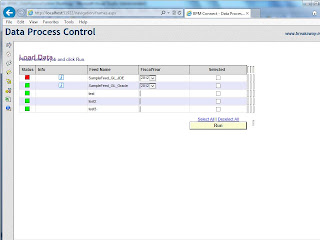
This can be immediately solved by placing Internet Explorer in reverse compatibility mode.
To accomplish this, in Internet Explorer, go to Menu Bar -> Tools -> Compatibility View. When applying this setting, the problem should be rectified. See example:

Full support for Internet Explorer V10 will be released in Data Process Control 3.2.1. This release will be packaged as part of the 313 pack for BPM Connect.

This can be immediately solved by placing Internet Explorer in reverse compatibility mode.
To accomplish this, in Internet Explorer, go to Menu Bar -> Tools -> Compatibility View. When applying this setting, the problem should be rectified. See example:

Full support for Internet Explorer V10 will be released in Data Process Control 3.2.1. This release will be packaged as part of the 313 pack for BPM Connect.
Sunday, February 3, 2013
ETL Engine Bulletin: 3.x Sync Solution
For ETL Engine SSIS package 2008.3.x or 2012.3.x there is a patch for the "Sync" method.
When running feeds in "Sync" mode using the 3.x package series, the data is sent to the primary fact table rather than the write-back, thus the data is not reflected in the cube after feed completion.
This has been solved in the X.3.2.1 release series of the ETL Engine.
This problem is solved in the 313 pack.
When running feeds in "Sync" mode using the 3.x package series, the data is sent to the primary fact table rather than the write-back, thus the data is not reflected in the cube after feed completion.
This has been solved in the X.3.2.1 release series of the ETL Engine.
- For SQL Server 2008, download and apply ETL Engine 2008.3.2.1.dtsx
- For SQL Server 2012, download and apply ETL Engine 2012.3.2.1.dtsx
- Download and place the respective .dtsx file into the DTS working directory on the BPM Connect server.
- Re-point the DTSXpackageName setting to the new dtsx file name.
This problem is solved in the 313 pack.
How to determine DTS working directory in BPM Connect
To determine the DTS working directory in BPM Connect, run the following SQL command on the BPM Connect database:
select [Value] from CONST_SYS where KeyID = 'DTSPackageLocation'
select [Value] from CONST_SYS where KeyID = 'DTSPackageLocation'
Sunday, January 20, 2013
Feeds will not cancel in Data Process Control
Please reference this error when this symptom occurs.
http://bpmconnect.blogspot.com/2013/01/error-metadata-could-not-be-determined.html
http://bpmconnect.blogspot.com/2013/01/error-metadata-could-not-be-determined.html
Saturday, January 19, 2013
Error: The metadata could not be determined
The following error is logged on the Application event viewer.
DataRequester - Microsoft OLE DB Provider for SQL Server Desc: The metadata could not be determined because statement 'EXECUTE master.dbo.xp_sqlagent_is_starting @retval OUTPUT' in procedure 'sp_is_sqlagent_starting' invokes an extended stored procedure.
The symptom of this error is usually one of two displayed in the Data Process Control.
- The Cancel button has no impact when trying to can jobs. Everytime the cancel button is pushed, the metadata error is logged in the event viewer
- When running feeds, the status shows jobs pending with no progression. Jobs hang endlessly in pending mode. Every attempt to run a feed, the metadata error is logged in the event viewer.
This is an issue with the new SQL Server 2012 meta data repository capabilities and how it works with SQL Server Agent 2012.
This issue has been solved in the 313 pack of BPM Connect.
Feeds cancel themselves when running mutiple feeds
Symptom: When running more than one process in Data Process Control, the feeds will cancel themselves in mid run. This is not expected behavior
Upon further inspection in the SQL Server Agent logs, the following error is displayed:
Job BPMC_ONDEMAND_BROKER was deleted while it was executing: the outcome was (Unknown).
This error is subtle a bug with the SQL Server Agent 2012 and how it handles job create and destroy events.
Solution: apply BPM Connect 213 pack, DBObject_v3.2.1. The p_UI_BROKER 3.0 routine has been re-encoded to work around this issue.
Upon further inspection in the SQL Server Agent logs, the following error is displayed:
Job BPMC_ONDEMAND_BROKER was deleted while it was executing: the outcome was (Unknown).
This error is subtle a bug with the SQL Server Agent 2012 and how it handles job create and destroy events.
Solution: apply BPM Connect 213 pack, DBObject_v3.2.1. The p_UI_BROKER 3.0 routine has been re-encoded to work around this issue.
Sunday, January 13, 2013
BPMC IFramework 312 Pack
The BPM Connect 312 Pack is now available.
This pack provides cumulative refinements to the core 300 pack, and includes, but is not limited to the following solutions:
Manifest.txt
312 Pack can be obtained from Breakaway Technologies.
BPMC_IFramework_312.exe
This pack provides cumulative refinements to the core 300 pack, and includes, but is not limited to the following solutions:
- Data Process Control 3.2
- Config Builder 3.2 - Validation improvements and instance keyword search and replace
- Support for distributed staging servers and destination servers
- Minor bug fixes for SQL Server 2012 installed (see release notes)
- SSIS Engine 3.1.3
Manifest.txt
312 Pack can be obtained from Breakaway Technologies.
BPMC_IFramework_312.exe
Data Process Control 3.2
The new Data Process Control for BPMC has an new updated look and feel.
In addition, there is improvements to the following key areas:

 Data Process Control 3.2 is available in the 312 Pack of BPM Connect.
Data Process Control 3.2 can be installed on prior pack levels, and requires DBObjects_v1.6.1 or higher for proper operation.
In addition, there is improvements to the following key areas:
- Error logging - The new Data Process Control now logs error detail to the Windows application log on the application server. This is especially helpful when troubleshooting issues.
- Alternating Row Shading on Process Grids - This has been a long time request. This makes the Load Data panel grid and Schedule panel grid easier to use on instances with large amounts of feeds.

- Adjustable Left Hand Navigation - The left hand navigation screen now has adjustable navigation. There are two views: Icon view and Link view. This helps on instances with large amounts of feeds to maximize Horizontal screen real-estate. Can can be toggled back and forth depending on the need.

Data Process Control 3.2 can be installed on prior pack levels, and requires DBObjects_v1.6.1 or higher for proper operation.
Subscribe to:
Posts (Atom)